If you cannot turn your Philips Tower Fan on, off, or switch the modes, find below possible causes and solutions.
I cannot turn on/off my Philips Tower Fan
Published on 20 May 2026
Not turning on
Please ensure you plugged the device into the wall socket correctly or try another socket.
Not turning off or switching modes (CX5535 only)
The information below applies only to model CX5535.
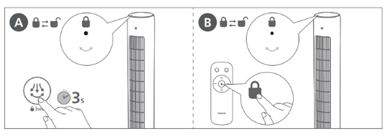
When the child lock is activated, the appliance will not respond to the remote control and the control panel. You can deactivate the child lock by touching the oscillation button for three seconds on the control panel or the lock button on the remote control (as indicated in the image below).
The timer is set to "Off" (CX1210, CX1220 only)
The information below applies only to models CX1210 and CX1220.
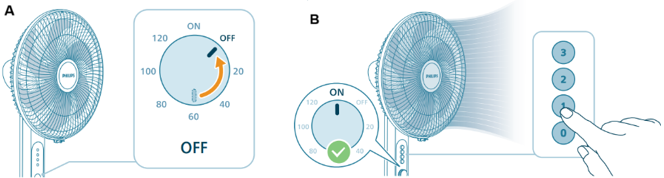
Please check if the knob is set to “OFF” (as indicated in image A) for the timer function. If this is the case, the fan will not be turned on when pressing the "fan speed" button. To turn your Philips Fan on, please set the knob to “ON” and then press the desired fan speed (as indicated in below image B).
If the appliance still does not work, contact us for further assistance.